
型号   容量                 PCI接口
F20   96G/4 domains
F40  400G/4 domains        PCI Express 2.0 (x8)
F80  800G/4 domains        PCI Express 2.0 (x8)
F160 1.6T/single domain    PCI Express 3.0 (x4)
F320 3.2T/single domain    PCI Express 3.0 (x8)
F20配置表
http://www.oracle.com/us/products/servers-storage/storage/flash-storage/f20-data-sheet-403555.pdf
F40配置表和图片
http://www.oracle.com/us/products/servers-storage/storage/flash-storage/f40-data-sheet-1733796.pdf

F80配置表和图片
http://www.oracle.com/us/products/servers-storage/storage/flash-storage/f80-ds-2043658.pdf
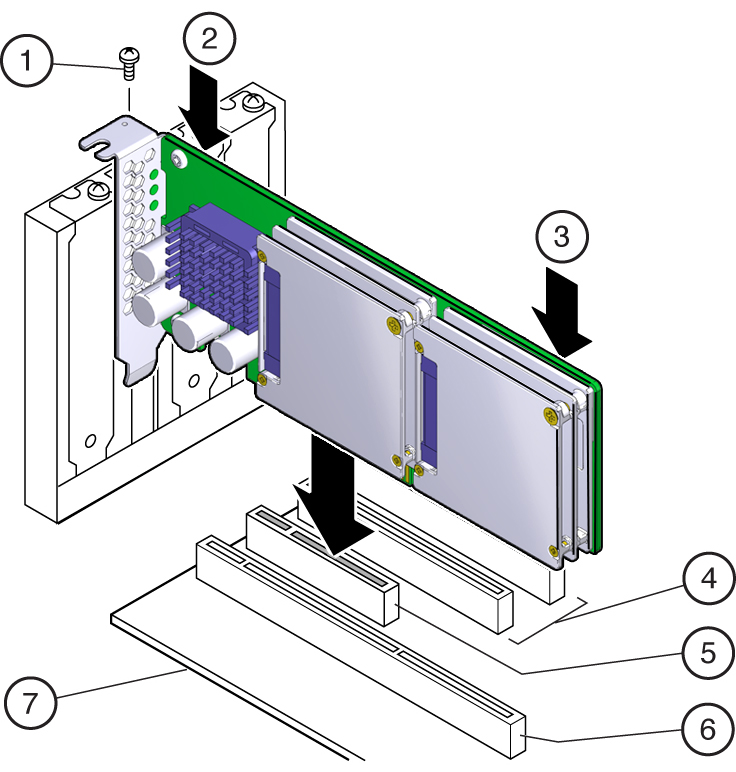
F160配置表和图片
http://www.oracle.com/us/products/servers/f160datasheet-2900793.pdf
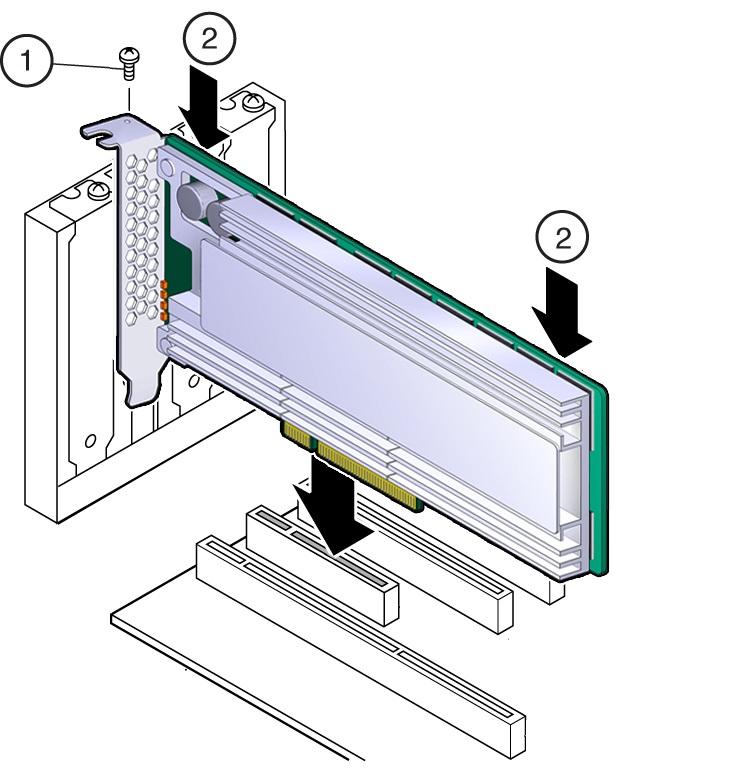
F320配置表和图片
http://www.oracle.com/us/products/servers/f320datasheet-2900794.pdf
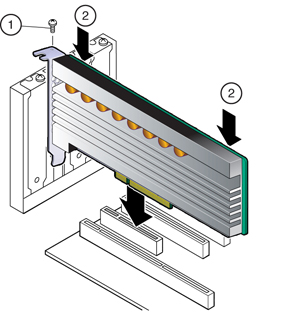
PCIe卡安装操作文档(适合于Oracle服务器,包括Exadata和SPARC)
http://www.oracle.com/technetwork/documentation/oracle-system-options-190050.html
Part Number
Link
Download
Description
E65386-01
View Library
Download
Oracle Flash Accelerator F320 PCIe Card and 3.2 TB NVMe SSD Documentation
E54943-01
View Library
Download
Oracle Flash Accelerator F160 PCIe Card and 1.6TB NVMe SSD Documentation
E41278-01
View Library
Download
Sun Flash Accelerator F80 PCIe Card Documentation
E29748-01
View Library
Download
Sun Flash Accelerator F40 PCIe Card Documentation
E40015-01
View Library
Download
Sun Flash Accelerator F40 PCIe Card Documentation (German)
E37921-01
View Library
Download
Sun Flash Accelerator F40 PCIe Card Documentation (Spanish)
E37923-01
View Library
Download
Sun Flash Accelerator F40 PCIe Card Documentation (French)
E40014-01
View Library
Download
Sun Flash Accelerator F40 PCIe Card Documentation (Italian)
E40016-01
View Library
Download
Sun Flash Accelerator F40 PCIe Card Documentation (Brazilian Portuguese)
E37922-01
View Library
Download
Sun Flash Accelerator F40 PCIe Card Documentation (Japanese)
E37924-01
View Library
Download
Sun Flash Accelerator F40 PCIe Card Documentation (Korean)
E37925-01
View Library
Download
Sun Flash Accelerator F40 PCIe Card Documentation (Simplified Chinese)
E40013-01
View Library
Download
Sun Flash Accelerator F40 PCIe Card Documentation (Traditional Chinese)
E19682-01
View Library
Download
Sun Flash Accelerator F20 PCIe Card Documentation
E19815-01
View Library
Download
Sun Storage F5100 Flash Array Documentation
E19208-01
View Library
Download
Sun Storage 32GB SLC SATA Solid State Drive Documentation
E23247-01
View Library
Download
Sun Storage 100GB eMLC SATA Solid State Drive Documentation
E23249-01
View Library
Download
Sun Storage 300GB eMLC SATA Solid State Drive Documentation
E56815-01
View Library
Download
1.6 Tbyte, 2.5-inch, Read Intensive Solid State Drive Disk Drive Specification, 12Gb SAS-3 Interface Documentation
E41840-01
View Library
Download
1.6 Tbyte, 2.5-inch, Read Intensive Solid State Drive Disk Drive Specification, 6Gb SAS-2 Interface Documentation
E56819-01
View Library
Download
200 Gbyte, 2.5-inch, High Endurance Solid State Drive, 12Gbps SAS-3 Interface Documentation
E48745-01
View Library
Download
400 Gbyte, 2.5-inch, 6Gb/s SATA Solid State Drive Disk Drive Documentation
E56817-01
View Library
Download
400 Gbyte, 2.5-inch, General Purpose Solid State Drive Documentation
下面的示例为在SPARC T5-2(Solaris 11)上的操作
查看磁盘信息
root@solaris # format
Searching for disks...done
AVAILABLE DISK SELECTIONS:
       0. c0t500117310028BC30d0 <ATA-2E256-TS2-550B00-UI5P-186.26GB>
          /scsi_vhci/disk@g500117310028bc30
       1. c0t500117310028C1E8d0 <ATA-2E256-TS2-550B00-UI5P-186.26GB>
          /scsi_vhci/disk@g500117310028c1e8
       2. c0t500117310028C7FCd0 <ATA-2E256-TS2-550B00-UI5P-186.26GB>
          /scsi_vhci/disk@g500117310028c7fc
       3. c0t500117310028C954d0 <ATA-2E256-TS2-550B00-UI5P-186.26GB>
          /scsi_vhci/disk@g500117310028c954
       4. c0t500117310028C978d0 <ATA-2E256-TS2-550B00-UI5P-186.26GB>
          /scsi_vhci/disk@g500117310028c978
       5. c0t500117310028CDE0d0 <ATA-2E256-TS2-550B00-UI5P-186.26GB>
          /scsi_vhci/disk@g500117310028cde0
       6. c0t500117310028D1E0d0 <ATA-2E256-TS2-550B00-UI5P-186.26GB>
          /scsi_vhci/disk@g500117310028d1e0
       7. c0t500117310028D794d0 <ATA-2E256-TS2-550B00-UI5P-186.26GB>
          /scsi_vhci/disk@g500117310028d794
       8. c2t3FE263104FDC5002d0 <LSI-Logical Volume-3000 cyl 35641 alt 2 hd 256 sec 64>
          /pci@300/pci@1/pci@0/pci@2/scsi@0/iport@v0/disk@w3fe263104fdc5002,0
Specify disk (enter its number): 0
selecting c0t500117310028BC30d0
[disk formatted]
FORMAT MENU:
        disk       - select a disk
        type       - select (define) a disk type
        partition  - select (define) a partition table
        current    - describe the current disk
        format     - format and analyze the disk
        repair     - repair a defective sector
        label      - write label to the disk
        analyze    - surface analysis
        defect     - defect list management
        backup     - search for backup labels
        verify     - read and display labels
        inquiry    - show disk ID
        volname    - set 8-character volume name
        !<cmd>     - execute <cmd>, then return
        quit
format> p
PARTITION MENU:
        0      - change `0' partition
        1      - change `1' partition
        2      - change `2' partition
        3      - change `3' partition
        4      - change `4' partition
        5      - change `5' partition
        6      - change `6' partition
        select - select a predefined table
        modify - modify a predefined partition table
        name   - name the current table
        print  - display the current table
        label  - write partition map and label to the disk
        !<cmd> - execute <cmd>, then return
        quit
partition> p
Current partition table (original):
Total disk sectors available: 390608550 + 16384 (reserved sectors)

Part      Tag    Flag     First Sector         Size         Last Sector
  0        usr    wm               256      186.26GB          390608583
  1 unassigned    wm                 0           0               0
  2 unassigned    wm                 0           0               0
  3 unassigned    wm                 0           0               0
  4 unassigned    wm                 0           0               0
  5 unassigned    wm                 0           0               0
  6 unassigned    wm                 0           0               0
  8   reserved    wm         390608584        8.00MB          390624967
partition>
安装SVM(Solaris9改名为SolarisVolumeManager,之前名称为SUN Solstice DiskSuite)
root@solaris # pkg publisher
PUBLISHER                   TYPE     STATUS P LOCATION
solaris                     origin   online F file:///IPS/FULL/repo/
root@solaris # pkg install storage/svm
           Packages to install:   1
       Create boot environment:  No
Create backup boot environment: Yes
            Services to change:   1

DOWNLOAD                                PKGS         FILES    XFER (MB)   SPEED
Completed                                1/1       103/103      1.6/1.6    0B/s

PHASE                                          ITEMS
Installing new actions                       163/163
Updating package state database                 Done
Updating image state                            Done
Creating fast lookup database                   Done
root@solaris # which metadb
/usr/sbin/metadb
root@solaris # which metainit
/usr/sbin/metainit
root@solaris #
安装md driver
root@solaris # update_drv -f md创建stat db
root@solaris # metadb -a -f -c 3 /dev/dsk/c0t500117310028BC30d0s0
stat信息很重要,创建了3份镜像
root@solaris # metainit d10 1 7 c0t500117310028C1E8d0s0 c0t500117310028C7FCd0s0 c0t500117310028C954d0s0 c0t500117310028C978d0s0 c0t500117310028CDE0d0s0 c0t500117310028D1E0d0s0 c0t500117310028D794d0s0
d10: Concat/Stripe is setup
创建文件系统
root@solaris # newfs /dev/md/rdsk/d10
newfs: construct a new file system /dev/md/rdsk/d10: (y/n)? y
/dev/md/rdsk/d10:       2734227456 sectors in 445024 cylinders of 48 tracks, 128 sectors
        1335072.0MB in 27814 cyl groups (16 c/g, 48.00MB/g, 64 i/g)
super-block backups (for fsck -F ufs -o b=#) at:
 32, 98464, 196896, 295328, 393760, 492192, 590624, 689056, 787488, 885920,
Initializing cylinder groups:
...............................................................................
...............................................................................
...............................................................................
...............................................................................
...............................................................................
...............................................................................
...............................................................................
...
super-block backups for last 10 cylinder groups at:
 2733248032, 2733346464, 2733444896, 2733543328, 2733641760, 2733740192,
 2733838624, 2733937056, 2734035488, 2734133920
root@solaris #
挂载文件系统root@solaris # mount -f ufs /dev/md/dsk/d10 /oradata root@solaris #
在SPARC上用F80(PCIe)做RAID 0+1
删除之前的卷
root@solaris # metaclear d10
d10: Concat/Stripe is cleared
root@solaris #
在另外一块磁盘追加2份stat db数据到
root@solaris #
root@solaris # metadb -a -c 2 /dev/dsk/c0t500117310028C1E8d0s0
创建逻辑卷
root@solaris # metainit d10 1 3 c0t500117310028C7FCd0s0 c0t500117310028C954d0s0 c0t500117310028C978d0s0
d10: Concat/Stripe is setup
root@solaris # metainit d11 1 3 c0t500117310028CDE0d0s0 c0t500117310028D1E0d0s0 c0t500117310028D794d0s0
d11: Concat/Stripe is setup
root@solaris #
创建镜像
root@solaris # metainit d20 -m d10
d20: Mirror is setup
root@solaris # metattach d20 d11
d20: submirror d11 is attached
root@solaris #
创建文件系统
root@solaris # newfs /dev/md/rdsk/d20
newfs: construct a new file system /dev/md/rdsk/d20: (y/n)? y
Warning: 4096 sector(s) in last cylinder unallocated
/dev/md/rdsk/d20:       1171816448 sectors in 190726 cylinders of 48 tracks, 128 sectors
        572176.0MB in 11921 cyl groups (16 c/g, 48.00MB/g, 5824 i/g)
super-block backups (for fsck -F ufs -o b=#) at:
 32, 98464, 196896, 295328, 393760, 492192, 590624, 689056, 787488, 885920,
Initializing cylinder groups:
...............................................................................
...............................................................................
...............................................................................
.
super-block backups for last 10 cylinder groups at:
 1170899872, 1170998304, 1171096736, 1171195168, 1171293600, 1171392032,
 1171490464, 1171588896, 1171687328, 1171785760
root@solaris #
挂载文件系统root@solaris # mount -F ufs /dev/md/dsk/d20 /oradata
root@solaris # df -h
Filesystem Size Used Available Capacity Mounted on
rpool/ROOT/solaris 274G 32G 23G 59% /
/devices 0K 0K 0K 0% /devices
/dev 0K 0K 0K 0% /dev
ctfs 0K 0K 0K 0% /system/contract
proc 0K 0K 0K 0% /proc
mnttab 0K 0K 0K 0% /etc/mnttab
swap 72G 2.6M 72G 1% /system/volatile
objfs 0K 0K 0K 0% /system/object
sharefs 0K 0K 0K 0% /etc/dfs/sharetab
fd 0K 0K 0K 0% /dev/fd
rpool/ROOT/solaris/var
274G 639M 23G 3% /var
swap 72G 128M 72G 1% /tmp
rpool/VARSHARE 274G 788K 23G 1% /var/share
rpool/export 274G 68M 23G 1% /export
rpool/export/home 274G 228K 23G 1% /export/home
rpool/export/home/afcdb
274G 144K 23G 1% /export/home/afcdb
rpool/export/home/informix
274G 164K 23G 1% /export/home/informix
rpool/export/home/mqm
274G 144K 23G 1% /export/home/mqm
rpool/export/home/oracle
274G 6.7M 23G 1% /export/home/oracle
rpool 274G 212K 23G 1% /rpool
/dev/md/dsk/d20 550G 256M 545G 1% /oradata
root@solaris #
查看同步信息root@solaris # metastat
d20: Mirror
Submirror 0: d10
State: Okay
Submirror 1: d11
State: Resyncing
Resync in progress: 66 % done
Pass: 1
Read option: roundrobin (default)
Write option: parallel (default)
Size: 1171816448 blocks (558 GB)
d10: Submirror of d20
State: Okay
Size: 1171816448 blocks (558 GB)
Stripe 0: (interlace: 1024 blocks)
Device Start Block Dbase State Reloc Hot Spare
/dev/dsk/c0t500117310028C7FCd0s0 0 No Okay Yes
/dev/dsk/c0t500117310028C954d0s0 0 No Okay Yes
/dev/dsk/c0t500117310028C978d0s0 0 No Okay Yes
d11: Submirror of d20
State: Resyncing
Size: 1171816448 blocks (558 GB)
Stripe 0: (interlace: 1024 blocks)
Device Start Block Dbase State Reloc Hot Spare
/dev/dsk/c0t500117310028CDE0d0s0 0 No Okay Yes
/dev/dsk/c0t500117310028D1E0d0s0 0 No Okay Yes
/dev/dsk/c0t500117310028D794d0s0 0 No Okay Yes
Device Relocation Information:
Device Reloc Device ID
/dev/dsk/c0t500117310028CDE0d0 Yes id1,sd@n500117310028cde0
/dev/dsk/c0t500117310028D1E0d0 Yes id1,sd@n500117310028d1e0
/dev/dsk/c0t500117310028D794d0 Yes id1,sd@n500117310028d794
/dev/dsk/c0t500117310028C7FCd0 Yes id1,sd@n500117310028c7fc
/dev/dsk/c0t500117310028C954d0 Yes id1,sd@n500117310028c954
/dev/dsk/c0t500117310028C978d0 Yes id1,sd@n500117310028c978
root@solaris #
查看stat db信息root@solaris # metadb
flags first blk block count
a u 16 8192 /dev/dsk/c0t500117310028BC30d0s0
a u 8208 8192 /dev/dsk/c0t500117310028BC30d0s0
a u 16400 8192 /dev/dsk/c0t500117310028BC30d0s0
a u 16 8192 /dev/dsk/c0t500117310028C1E8d0s0
a u 8208 8192 /dev/dsk/c0t500117310028C1E8d0s0
root@solaris #
测试下速度SQL> alter tablespace web_data add datafile '/oradata/gold/web_data02.dbf' size 16G; Tablespace altered. Elapsed: 00:00:33.90 SQL>
Reference
http://www.oracle.com/us/products/servers-storage/storage/flash-storage/overview/index.html
http://www.oracle.com/technetwork/documentation/oracle-system-options-190050.html
https://docs.oracle.com/cd/E19683-01/806-6111/6jf2ve3h9/index.html